FreeBSD upgrade-to-15
They say never underestimate the bandwidth of a station-wagon full of tapes, but a USB 3.2 NVMe enclosure with a 1TB stick in it is pretty slick, also. I’ve been moving it back-and-forth between FreeBSD machines to get everything updated, and here’s some notes (for my future-self, mostly).
ZPool is cool
The stick has a GPT on it, and then a couple of partitions. I followed the example in the gpart(8) manpage under GPT. That creates a boot-partition, some swap, and a UFS partition – as if you want to create a bootable FreeBSD disk.
After that I put a rest-of-the-disk partition of type freebsd-zfs. Using glabel(8) I labeled that partition as zjail (ZFS pools traditionally start with the letter Z, and this one is going to be mostly-for-jails).
Then zpool can be used to create a pool from that labeled partition.
gpart add -t freebsd-zfs da0
glabel label zjail da0p4
zpool create zjail label/zjail
Sure, it’s
not got any redundancy, nothing special, but it’s 1TB I can carry around,
and it’s easier than configuring NFS drives and/or WiFi on the laptop.
To use the space, zpool import zjail (just don’t forget to zpool export zjail
before shutting down).
etcupdate, ugh
Initially, I had a zjail/src filesystem, and under that some directories like src/ and ports/.
It is possible to buildworld and buildkernel there, but etcupdate (which is a tool that
updates the things in /etc/ based on the newly-built world) needs extra handholding
for that, and the error message isn’t very informative. I forget what it is, even,
because I ended up re-creating ZFS filesystems zjail/data/src and zjail/data/ports
and then setting the mountpoint property for them to mount them in the traditional locations.
AMD graphics
The graphics drivers in FreeBSD are imported from Linux. There are some kernel
shims, but basically we run the same graphics stack. However, the shim code
is some tricky PCI-wrangling, and in my case with FreeBSD 15.0 I could get a
text console, but loading the graphics drivers with kldload amdgpu would panic
the kernel.
There are issues #391 and #393 which look similar to the panic that I would see. Bjorn has a proposed patch which simplifies the PCI-wrangling a little (to my eyes, anyway). I applied the patch and rebuilt “all the things”, after which both slightly-older (drm-66-kmod) and newer (drm-latest-kmod, which corresponds to Linux 6.9) drivers seem to work.
I imagine some fixes will land soon, because “AMD graphics just doesn’t work” does not seem like a long-term sustainable situation. With the fixes applied, I have a working graphics stack, so …
KDE Plasma Wayland on FreeBSD 15
Assuming the graphics stack works, then KDE Plasma can be installed with pkg install plasma6-plasma . You can’t do
much with only Plasma and no applications at all, so pkg install konsole is recommended as well.
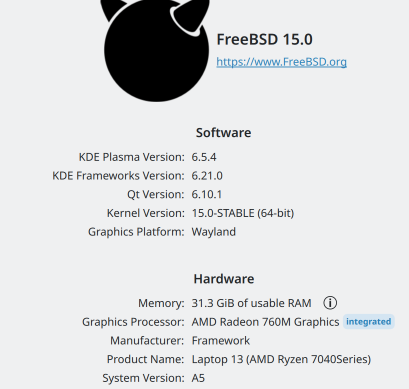
After that “it just works”, at least for the way that I use KDE Plasma. It takes a few clicks to change the settings to what I actually want (e.g. CTRL is next to the letter A) but after that it’s … just the usual KDE Plasma session, which looks like this in KInfoCenter: