FreeBSD 14-to-15 Upgrade (Intel)
This post has the notes I made while upgrading another laptop from FreeBSD 14 to FreeBSD 15. Since my first upgrade was a long and annoying process, I figured I would take notes for the second round. These notes are “how not to do it”, even if the end-result is KDE Plasma Wayland on FreeBSD 15, as desired.
The laptop I have already upgraded is a Framework 13 with an AMD 7640U CPU and integrated AMD Radeon (Phoenix1) GPU. That ran into the problem that the amdgpu kernel driver would panic with the stock kernel. After building a world and kernel and packages of the driver that are all patched and consistent, the system works fine.
The laptop I’m going to upgrade is a Slimbook Base 14 with Intel i5-10210U and integrated Intel Comet Lake GT2 GPU. This laptop has a FreeBSD 14 install on it, but I’m pretty sure I never ran it as a laptop-daily-driver. This is my openSUSE laptop most of the time.
Preparations
There is no meaningful user data on the FreeBSD partition, so I’m not going to bother with a backup. The existing installation is on a UFS filesystem. It is running 14.0-CURRENT from .. um .. 2022. That’s probably going to need upgrades before I can even use the external ZFS NVMe drive to get to the 15-update.
- Try to naively import the ZFS pool: fails because of missing features. (This was expected)
- Try to naively
freebsd-upgradeto 14.3: fails because that tool is meant for release versions, and won’t stomp all over some random -CURRENT. (This is good, but annoying right now) - Using ftp, fetch
base.txzandkernel.txzfor 14.3: that’s a 250MB download, which is pretty straightforward.
So now I’m going to stomp all over everything, which is exactly what the tool is preventing me from doing. Why else would there be a /rescue directory?
- Run
/rescue/tar xzf kernel.txz -C /to clobber the kernel. - Run
/rescue/tar xzf base.txz -C /to clobber everything else except the things that have flag schg (The files that are really fucking important). - For all the files that it complains about, run
/rescue/chflags noschg <file>to assert dominance. Ignore all the warnings and error messages that are now being printed because you’ve clobbered half the system. - Run
/rescue/tar zfs base.txz -C /command again and this time it will nuke everything. Welcome to live-replacing yourlibc. - Reboot.
The base install doesn’t have a root password and doesn’t have any users defined and will overwrite password files, so after the reboot log in as root with no password, and ignore messages about missing user ID for dbus and avahi and whatever. This continues to be a bad-idea approach.
The next step is importing the ZFS pool with my patched world and kernel and 15.0 packages, such as they are. Unfortunately, ZFS in 15.0 has some new feature-flags that even 14.3 doesn’t understand. The pool can be imported read-only, though.
- In the imported
/usr/src, runmake installkerneland ignore warnings about it being a read-only filesystem. After all, I just built everything (elsewhere) and am only interested in making this laptop a same-version-as the other laptop. - Run
make installworldand get an error message about missing libraries. - Run
cp /usr/obj/usr/src/amd64.amd64/tmp/lib/* /libto replace the missing libraries. This may log you out as you clobber more essential libraries with versions from 15-STABLE. - Log in again, go back to
/usr/srcand runmake installworld. - Run
etcupdate -Bto update system configuration. This probably warns about remaining modified files. Ignore that – I get warnings about opieaccess and telnetd which are lovely reminders of the early 2000s, though. - Reboot.
The system has now, in the most cursed-possible way, been upgraded to FreeBSD 15.0-CURRENT.
Packages for 15.0
After doing the cursed upgrade to a new OS version, the rest is reasonably normal:
pkg bootstrap -fto upgrade the packaging tools to the new OS versionpkg updateto fetch new packaging informationpkg upgradeto upgrade all the bits
I removed all Qt ports from the system before starting this, so that it wouldn’t have to deal with much in the way of desktop packages. There’s still 2GiB to upgrade, though (including LLVM 13 and 19; I suppose I can clean up some of that).
fwgetto get WiFi firmware- Removing unnecessary firmware packages cuts down on the number, but doesn’t save much space (e.g
pkg remove gpu-firmware-amd-*on this specific laptop, which is never going to have a different GPU) pkg install kdeto get the important things
Post-install Configuration
The
sysrc(8)commmand should be used to editrc.conf; no need to do everything in a cursed fashion.
- Configure the system console keymap by adding
keymap="us.ctrl.kbd"to/etc/rc.conf(the FreeBSD installer will do this for you, if you pick that keyboard layout, but this is the manual way after installation or when doing cursed upgrades) - Load the Intel graphics driver by adding
kld_list="i915kms"to/etc/rc.conf - Re-add the user to group video with
pw groupmod video -m <user>(because that stuff was clobbered, too)
I have a couple of extra steps and documentation written down from the last time I tried KDE Plasma Wayland on FreeBSD. Don’t bother with a display manager. SDDM isn’t worth it.
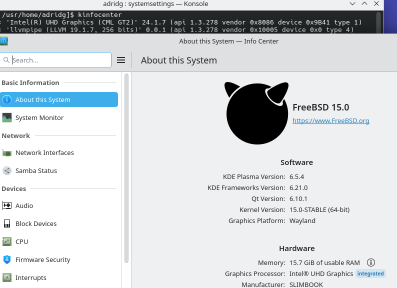
Log out, log back in, run that script, and here’s KDE Plasma Wayland running on FreeBSD 15 on Intel graphics:
This leaves just nVidia graphics to deal with, but for that I need to swap around some hardware in my workstation.